
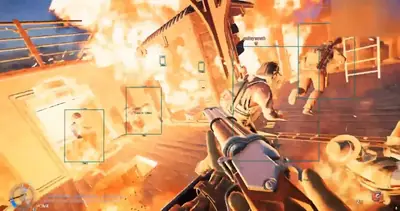
SAND: Raiders of Sophie Aimbot Settings Explained
The settings matter more than the aimbot itself. Here is what aim key, speed and FOV control, and how to tune them for different fights in SAND.
An aimbot is easy to describe and hard to use well. The same feature that looks natural with sensible settings looks blatant with bad ones. In SAND: Raiders of Sophie, where one crew often has the numbers and a Trampler for cover, the way you configure aim assistance decides how useful it is and how obvious it looks.
A typical SAND aimbot gives you four controls: enable or disable, an aim key, aim speed and FOV. Here is what each does.
Enable and disable
This is a toggle, but it is worth binding to a key you can reach under pressure. You will want the aimbot off while looting, driving or climbing, and on when a fight starts. A toggle you have to hunt for in a menu is a toggle you will forget to use.
Aim key
The aim key means the aimbot only acts while you hold a button. This is the setting that keeps aim assistance from taking over when you do not want it. Many players bind it to a mouse side button or a key near their movement hand. Choose something you can hold without changing how you grip your mouse, or your aim will wobble every time you press it.
Aim speed
Aim speed controls how fast the crosshair moves to the target. Higher speeds snap quickly, lower speeds glide.
Low speed looks closer to a skilled player tracking a target. It is slower to land the first shot but much harder for another player to notice in a clip.
High speed wins the opening exchange more reliably but is the setting most likely to get you reported.
If you play with a crew, other people can see your screen in a call or a stream. Smooth movement draws fewer questions.
FOV
FOV is the size of the circle around your crosshair within which the aimbot looks for targets. It is the most useful setting to understand.
Small FOV means the aimbot only acts on targets already close to your crosshair. It behaves more like an assist, and it will not yank your view toward someone you were not aiming at.
Large FOV reaches further, which helps with fast crossfires and long-range shots, but it can pull toward the wrong target when several enemies are on screen.
A reasonable approach is to start with a small FOV and moderate speed, then widen only if you find yourself missing fights you should win.
Tuning for different situations
SAND mixes close quarters and open ground, so one profile is rarely right for everything.
Inside buildings and tight ruins: small FOV, lower speed. Targets are close, angles are short and a wide FOV is more likely to grab the wrong person.
Open desert and long sightlines: larger FOV, moderate speed. Targets are small on screen and easier to lose.
Defending your Trampler: a moderate FOV helps you switch between several directions quickly, but be ready to turn the aimbot off when you move to repair or reload.
Large targets such as mechs behave differently from players on foot, so test your settings in a low-stakes situation before you rely on them in a fight over cargo.
Pair it with information
Aim assistance works best alongside awareness. Knowing where enemies are before the fight starts matters more than shaving a few milliseconds off your first shot. That is why many players pair it with ESP rather than relying on aim alone.
Be realistic about risk
Aim assistance is the feature most likely to get you reported by other players and the one anti-cheat teams care most about. Conservative settings reduce attention from other players but do not remove the chance of enforcement. Read what a ban actually means before you decide.
Where to get it
You can see the aimbot options and current plans on the SAND: Raiders of Sophie aimbot page, and our buyer’s guide covers what else to check before you commit.